

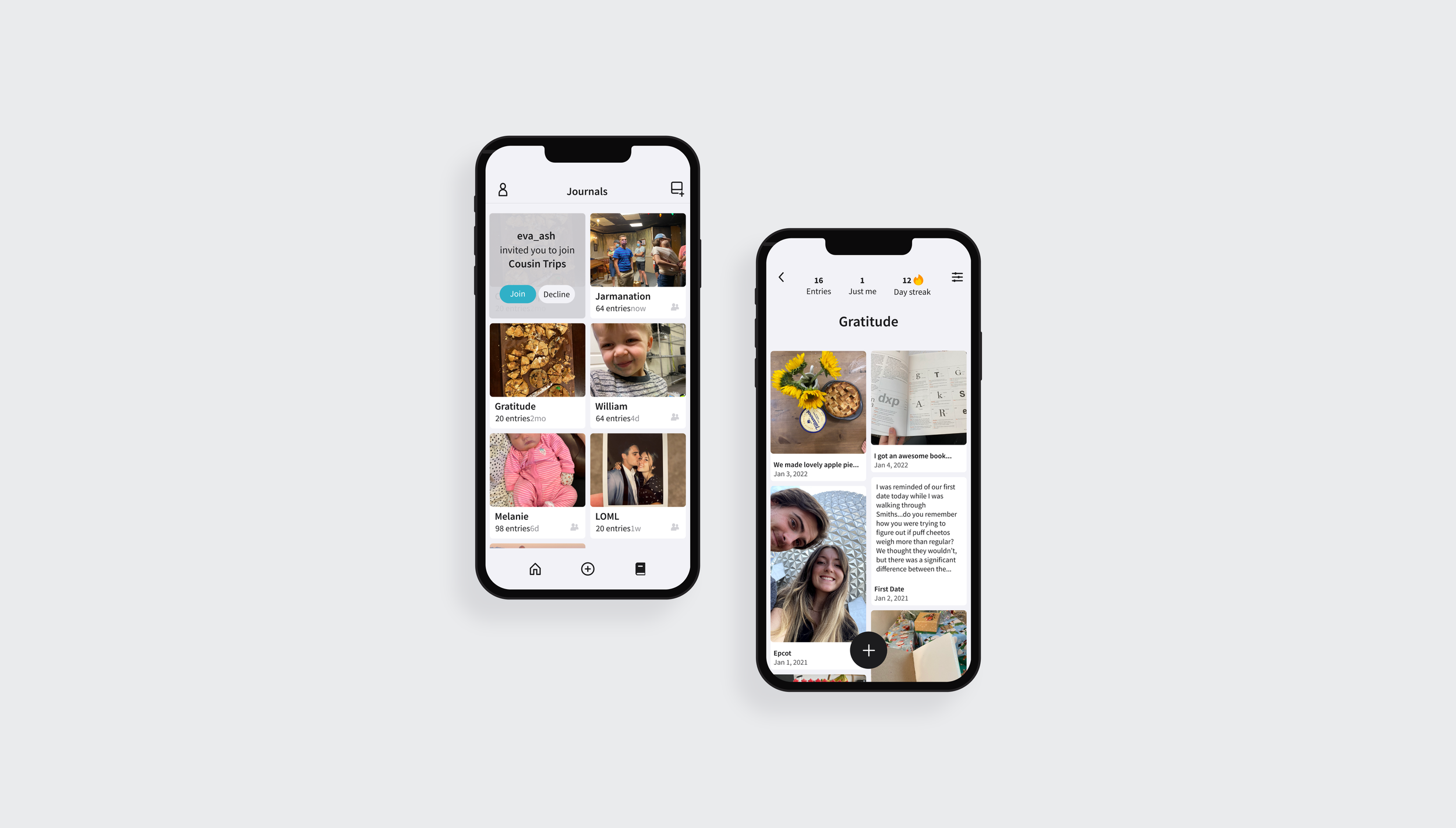
Told is a journaling app that lets moms collaboratively document and share their child’s lives with the people who matter most.
My goal was to create a better journaling experience than I had experienced with existing apps, however I stumbled onto a gap in the market as I interviewed potential users.
MY ROLE
Research
Design
Brand
Approach
Finding and Solving Problems Iteratively
The first step of my approach for this project was to find and validate a problem through research. The initial research I conducted included surveys, user interviews, and competitive analysis. Once I was confident I had a viable problem to solve, I took an iterative approach to designing and getting feedback. I made changes to my designs in between interviews and usability tests, until I had a final product. My goal was to end with designs for an MVP that only had features that were essential to test the idea, however, in early stages I explored many features that didn’t make it into the final cut.
Initial Research
Validating the Problem Through Initial Research
I embarked on this project because I wanted to gain experience conducting user research. The project needed to be something that the people I would be interviewing (my friends, family, coworkers, etc.) could provide feedback on. I wanted it to be something I was passionate about and would enjoy using. That’s how I landed on digital journaling.
I have lots of digital assets that I would like to organize, save, and share with a small group of people. However, I couldn’t find one journaling app that met all of my needs.
I had an initial idea for a shared journaling app that allowed social media like entries that could be saved in private or shared journals. I created a survey to learn if there was a gap in the current market.
If you want to see my exact wording and order of questions, you can take the 5-10 minute, anonymous survey journal. I recommend taking it before you move on or you may be influenced by the data below.
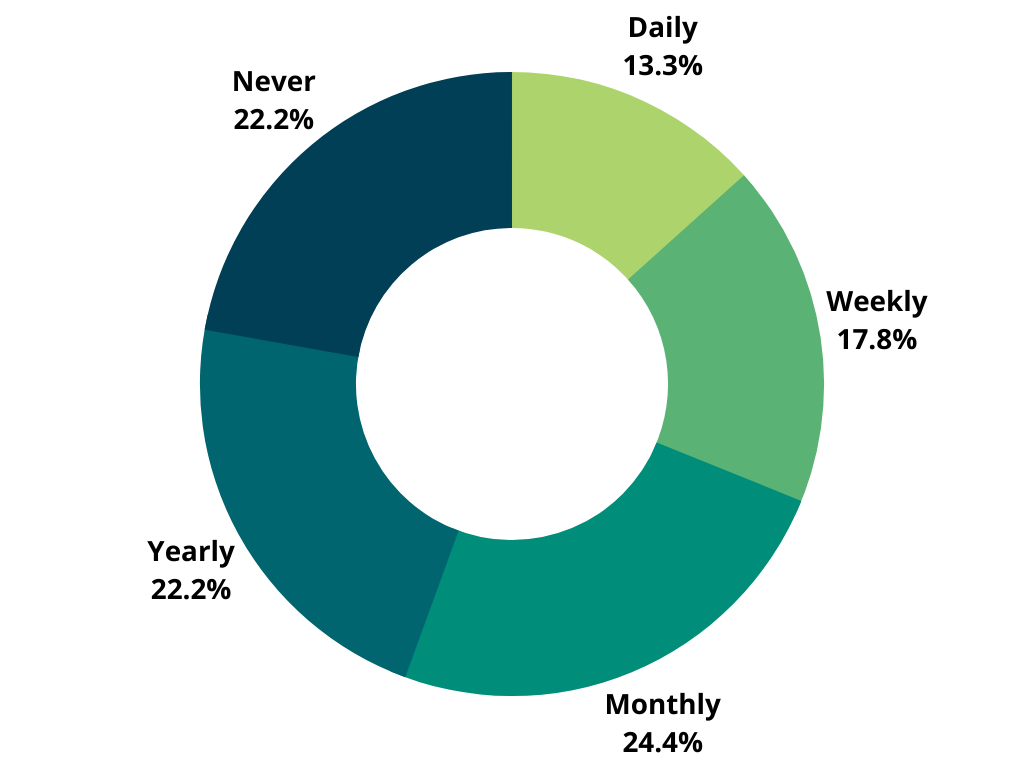
How often do you journal? (journal can refer to digitally, physically, etc…)
-
I specified that this includes any means of journaling - digitally, physically, etc. You can see that 78% of the respondents journal at least yearly, meaning the majority of my respondents do journal in some way.
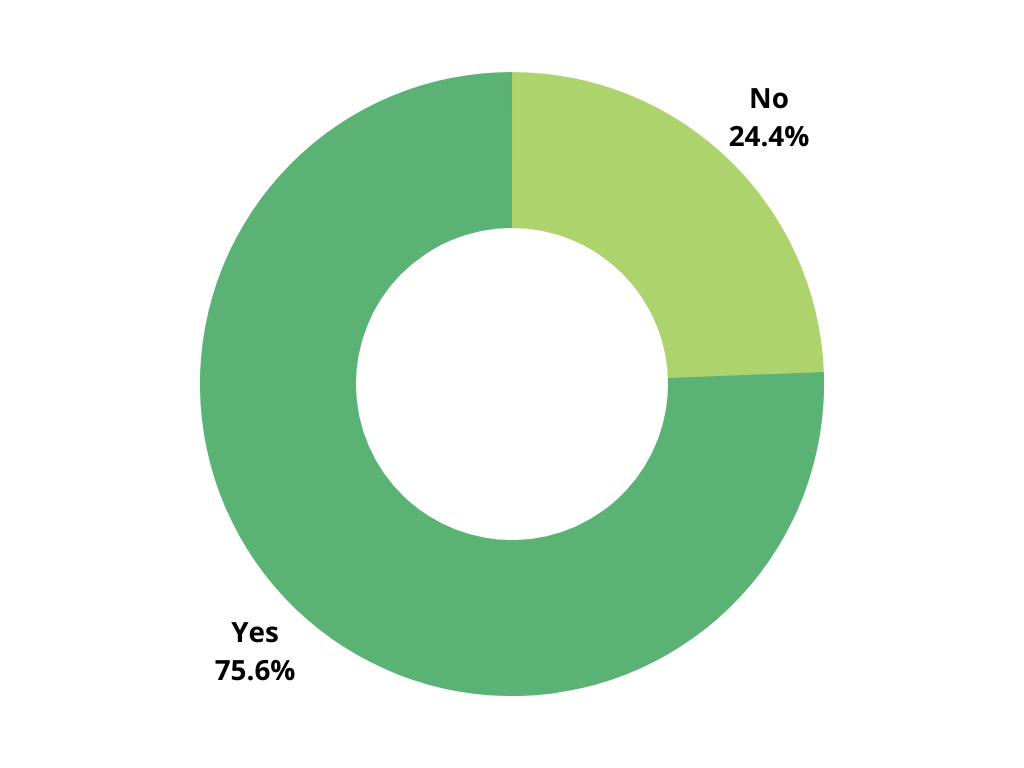
Do you wish you journaled more than you currently do? Why?
-
The majority responded yes, they wish they journaled more. Because this was an open ended question, I gained a variety of responses but there were clear patterns. The most frequent reason people answered yes had to do with better documenting their lives for themselves or posterity (55%). There were a handful of people who said yes because journaling is therapeutic to them (12%), and of the people who said no they felt that they already journaled enough (10%) or they had no desire to journal (12%).
This showed me that the large majority of respondents hadn’t found a tool that successfully helped them accomplish their journaling goals. I hoped to provide that.
*Percentages in () are referring to percentage of ALL respondents.
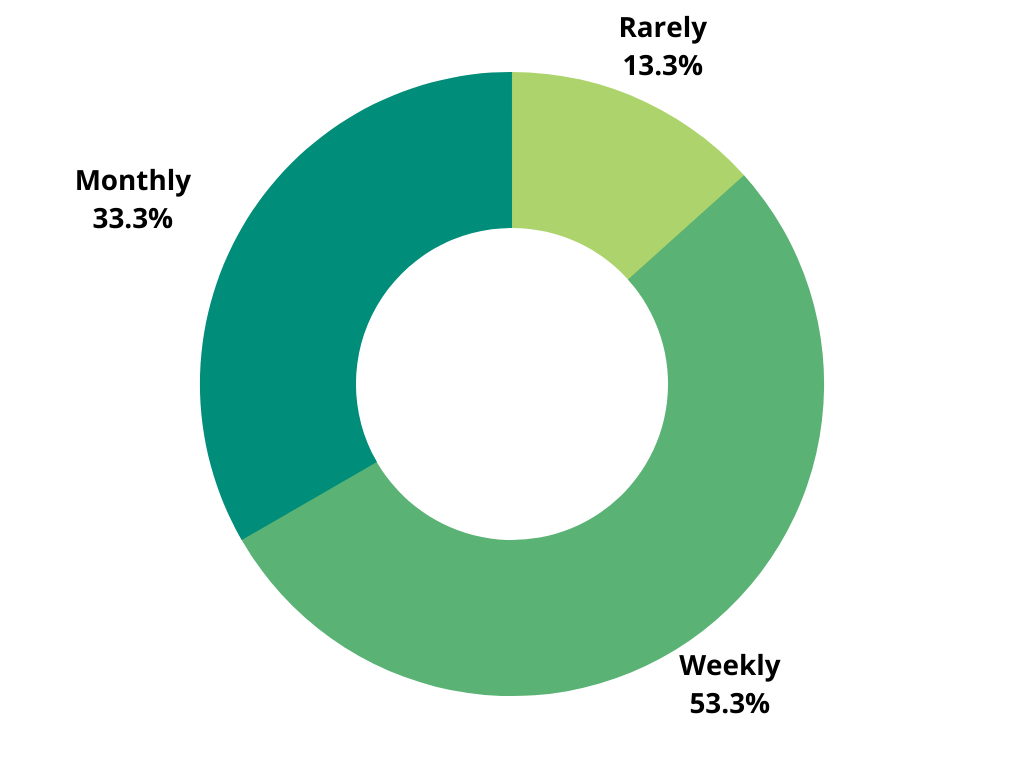
How often do you take meaningful photos of your life? (family, special events, etc…)
-
I hoped this question would validate my hypothesis that people take photos frequently, therefore, have many photos stored on their phones. 87% of respondents said they take photos at least monthly.
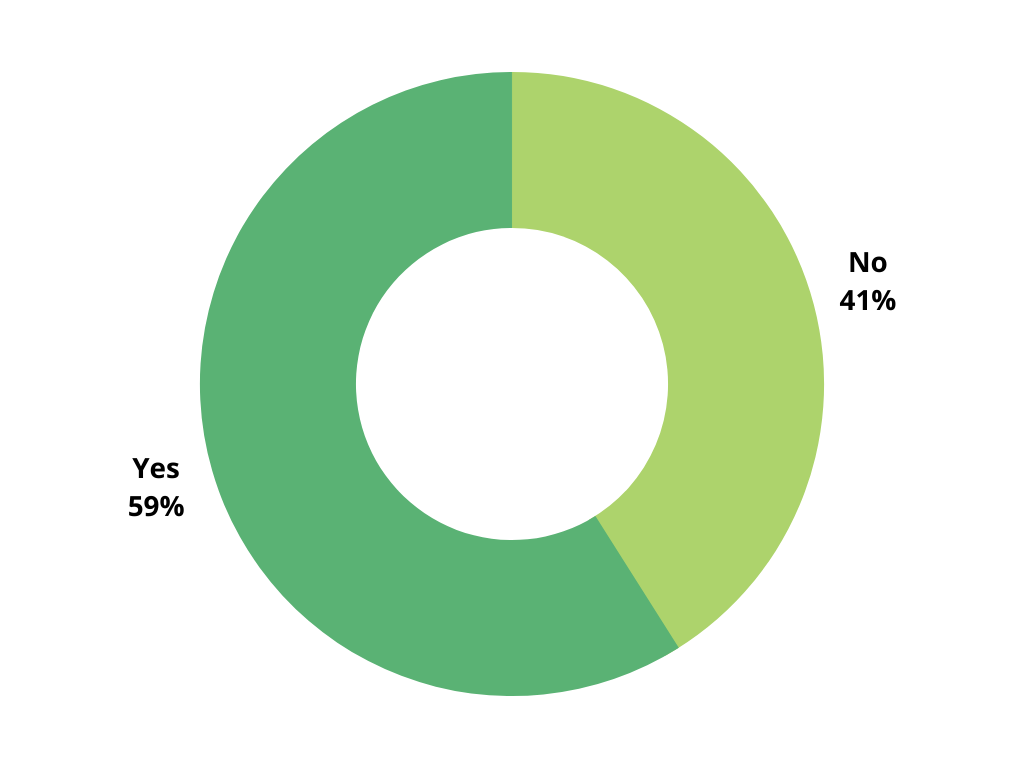
Do you feel those photos are put to good use? Why?
-
The slight majority of people answered yes. The majority of people who answered yes said it was because they enjoyed looking back on the photos they took (32%). Others said yes because they used their photos in their journals (15%) because they shared those photos with others (10%). On the other side, some respondents said no because they felt there was room for improvement (12%) or because they don’t use the photos for anything (15%).
I was hoping more people would answer no this question to show a need for better organization. However, I felt I could improve upon the positive experiences of the yes respondents by providing a beautiful viewing experience and sharing capabilities.
*Percentages in () are referring to percentage of ALL respondents.
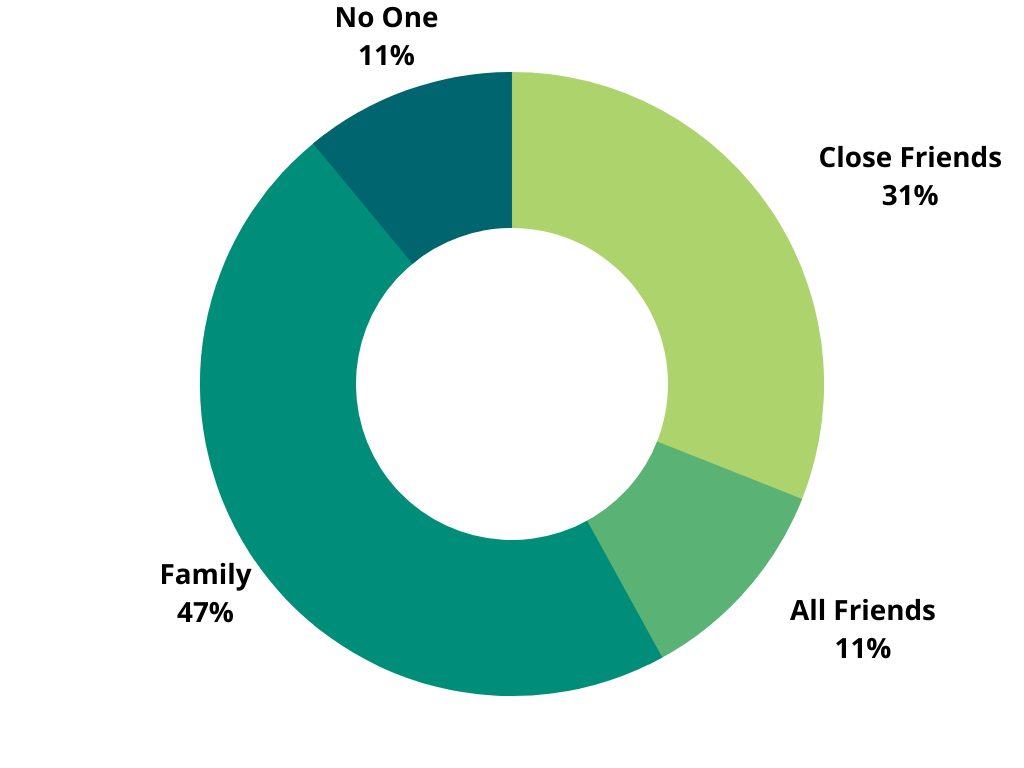
Who would you like to share these photos/experiences with?
-
I hoped this question would validate my hypothesis that people take photos frequently, therefore, have many photos stored on their phones. 87% of respondents said they take photos at least monthly.
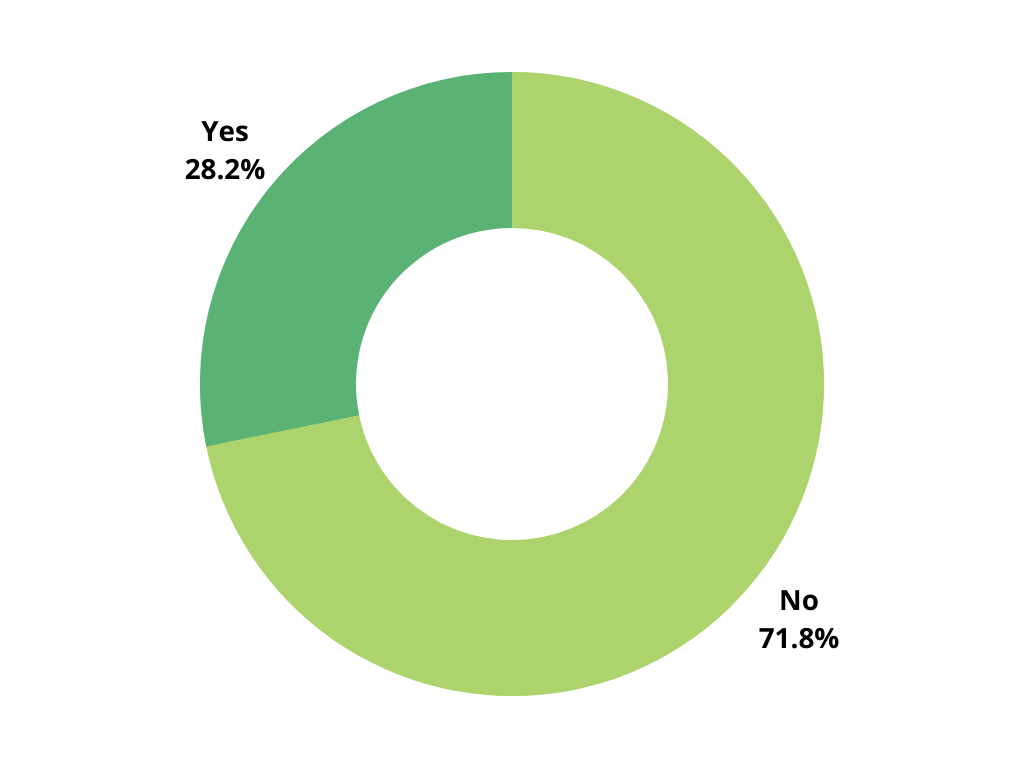
Does social media function as a journal for you? Why?
-
Many respondents answered no because they rarely posted (30%), or because it wasn’t personal/private enough (30%). A few people had a social media account that they used privately for journaling, but they were very rare (8%).
This showed me that social media wasn’t filling the space of digital journaling, even though it can provide documentation.
*Percentages in () are referring to percentage of ALL respondents.
Interviews
Defining the Problem and Finding a Target Market
I felt the results of the survey validated my initial concept enough to pursue further research. To learn more about specific needs and wants, I next conducted interviews with potential users.
The interviews focused on how people were currently journaling/sharing photos, what the pain points were, and feedback on the initial app concept.
Early in my interviews, I found a group of people who showed the most interest so I focused on them. This provided me with data for my three main personas and altered my overarching goals for the app.
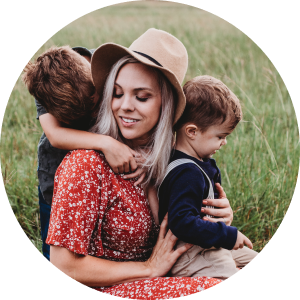
Primary User
Mom with Young Children
Goal: feel like she is properly documenting her young child’s lives despite her busy schedule.
-
Jenny is a young mom, 25 years old, with two kids and a job, she is spread thin and often feels exhausted. Sometimes it is hard to feel productive as a parent because despite cleaning up messes and resolving conflicts all day, they don’t stop coming.
Through out her days she experiences sweet or funny moments with her kids. If they are visual enough, she will take a photo to document that moment. However, if it is something funny or sweet that they said, she usually doesn’t document this, but she sometimes shares these stories with family.
Jenny is tech savvy, she uses her iPhone frequently each day. She takes photos often, however rarely posts to her instagram account. Posting to instagram requires more thought and time because many friends and acquaintances will see her posts.
Secondary User
Grandparent
Goal: feel more connected to her children and grandchildren.
-
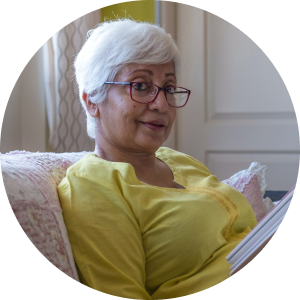
Phillis is 63 years old. She has three children, her youngest is now 30. All of her children have at least one child, most of them under 10 years old. Two of her children live in different states than her.
She wishes she could see more of her grandchildren because it feels like they are growing up so fast. To feel close to them she facetimes often and receives occasional photos from their parents. If Phillis could, she would spend much more of her time with her grand kids, but busy schedules, different locations, and life prevent that from happening.
Phillis has adopted technology into her daily life. She has had a smart phone for years now, and functions best with simple and consistent flows.

Secondary User
Aunt/Close Group of Friends
Goal: easily share and receive photos that she or her friends are in.
-
Callie is 20 years old and attending university. She lives on campus with 5 other girls. Callie and her roommates frequently post photos on instagram. They frequently take photos and videos with each other. One of her roommates has an android, so a group text doesn’t work well for them.
She and her roommates are very close and have many inside jokes. While they do post much of the content they create they put on instagram, there are still photos and stories they share with each other outside of that. Callie has two little nieces.
Even though she can’t see them daily, she adores them. She loves calling them and hearing funny stories from their parents.
JTBD
Prioritizing the right Jobs to be Done
Early on, I composed a list of ‘jobs to be done’ based on my assumptions of what the target market wanted. I asked my interviewees to rank them for me from most to least important, or suggest another if it wasn’t there. The four listed here were consistently ranked the highest in my interviews, in that order. This worked as a guide for me when designing or cutting features.
The top three, documenting, printing, and sharing, were very close in priority for moms. Documenting and Sharing were extremely close. Sometimes ranked on the same level, however Documenting was ranked slightly higher because sharing was seen as a want and documenting a need for the moms I interviewed.
Jobs to be done, or JTBD, is a framework that seeks to understand what drives customers to ‘hire’ a product to complete a ‘job’ for them.
-
1 - Documenting
When something memorable happens, I want to record the memory (picture + text) so my child, my family, and I will be able to look back on it in the future.
-
2 - Sharing
When something memorable happens in my child’s life, I want to share it with the people who love them so they can feel closer and appreciate with me.
-
3 - Printing
When I have photos and memories documented, I want a printed version so I can have a physical reminder of the important moments in my family’s life.
-
4 - Consuming
When something memorable happens to a close friend or family member, I want to see it so I can share that moment with them and feel more connected.
Competitive Analysis
What Else Performs These JTBD for my Target Market?
I gathered the competitors, pros, and cons from interviews. I needed to know if there was an existing product that solved my target market’s needs. Next, I wanted to know how these were and weren’t solving my target market’s needs so I could learn from them.
Below are alternatives that solve some of my essential ‘jobs to be done.’ However, I didn’t find any that solved ALL of my essential ‘jobs to be done.’ Many of the apps my interviewees were using weren’t designed or marketed as journaling apps. Now that I’d learned about the demand shown by my target market, the lack of a specific solution showed me there was a gap in the current market.
-
![]()
Day One
Pros
• Allows for multiple content formats.
• Print options.
• Text and photo entries.Cons
• Users can’t make multiple journals, instead must use tags.
• Users can’t share journals/entries by category with others.
• Subscription model that may scare people away because they want their journal entries to feel permanent (data from interviews).
• Crowded UI and sometimes confusing UX with all of the options provided. -
![]()
Google Drive
Pros
• Users can trust that their content will be permanently saved in a place they can access.
• Users can easily share and collaborate with family and friends.
• Users can add caption to photos.
• Users can create shared photos albums.
• Print options.Cons
• Doesn’t allow text entries without a photo.
• It can feel disorganized, photos and homework assignments get mixed together. -
![]()
Physical Journal
Pros
• Users can use it as a meditative process, helps them process recent important events in their life.
• It’s easy to find and use, doesn’t feel like a maze of digital entries and other content.
• There is a sense of privacy because you know that no one else will read it.Cons
• It takes longer to write than to type.
• It is a lot of work to add photos to this kind of journal.
• Need the lights to be on, which could bother spouse if it is late at night. -
![]()
Instagram
Pros
• Users can show photos to all of their friends, like announcements, fun trips, they can post to instagram with a caption on their photo.
• Users can view all of their friends posts and comment on them.Cons
• Users have to view a lot of content they don’t care much about.
• Users don’t feel comfortable posting because of the large audience.
• Users must post photos in chronological order, you can’t edit the order of posts afterwards. -
![]()
Apple Notes
Pros
• Users can use dividers to create journals for different topics (eg kids).
• Users can always access it on their phones and can trust that they won’t ever lose their content.
• Users can show date on entries.
• Users can use bullet formats to journal.Cons
• Not optimized for photo entries/daily entries.
• Difficult to search for entries, takes a lot of scrolling to look at old stuff.
• Only shareable to people with iphones. -
![]()
Marco Polo
Pros
• Users can send videos of fun things in their life, daily things or important events.
• Users can view content created by their friends/family easily.
• Videos feel personal.Cons
• Not meant to look back at these videos, not a permanent record.
• Hard to respond passively (comment), you have to respond by having new content to share.


Designing/Prototyping
Iterative Designs
The design and research happened asynchronously for this project. Many interviews prompted me to tweak my designs before my next interview or usability test.
In my earliest interviews I got feedback on wireframes to help me validate the idea. Next, I made high fidelity prototypes to conduct usability tests. Once I had fixed the reoccuring problems, I went back to validating the concept with my final designs.
Some things I learned through these tests: I had confusing navigation, an overly complicated entry creation process, and unclear iconography when it came to adding a post or creating a new journal.
Journals
The who and what
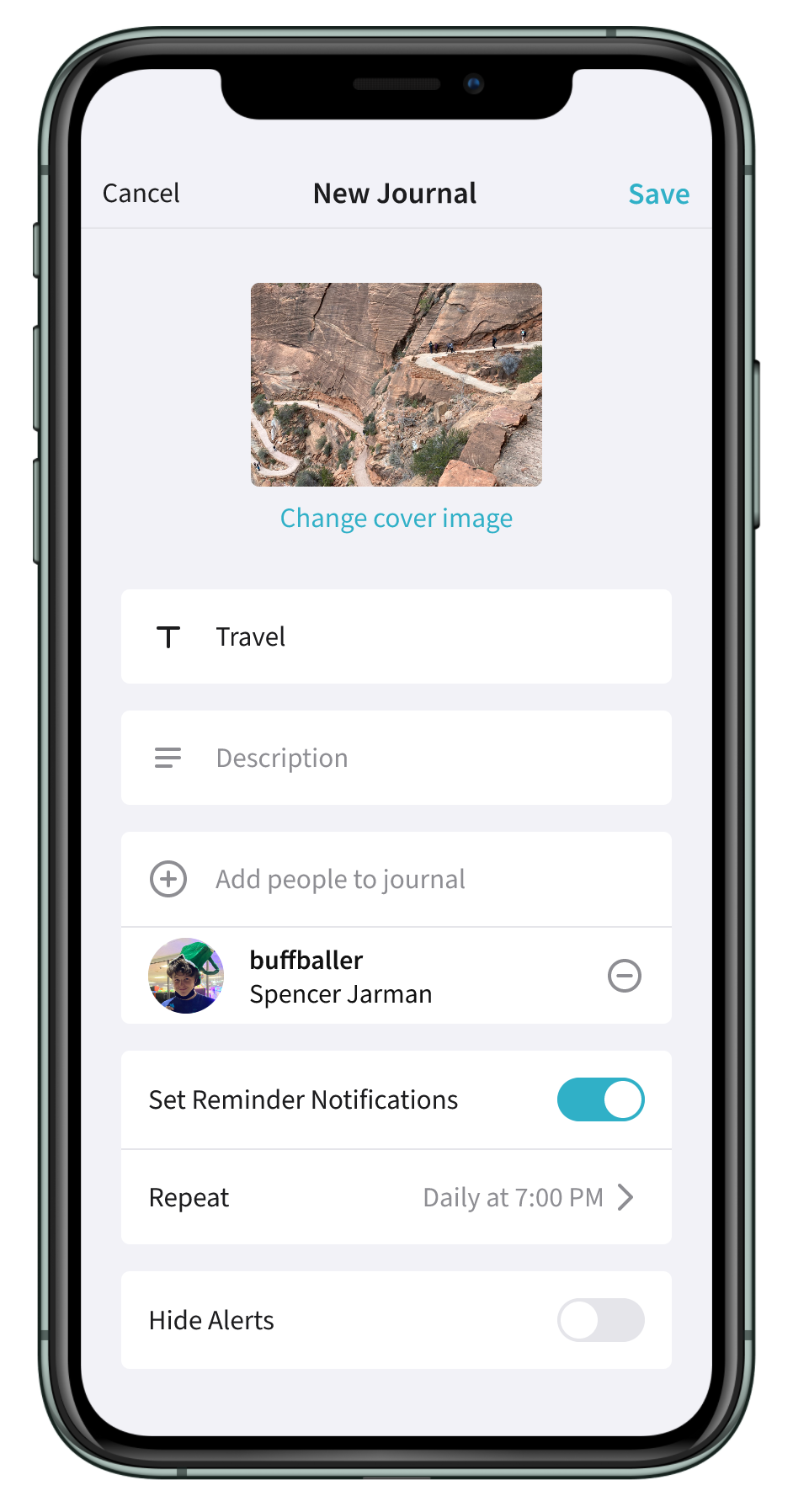
Journals are the building blocks of Told. They allow moms to simultaneously document, share, and receive content.
• Customize the title, cover image, and description for journals.
• Add collaborators who can view and contribute to journals.
• Set custom reminder notifications to consistently add entries.
• Hide alerts for journals you don’t want to be notified about.
Entries
Simple, convenient entries
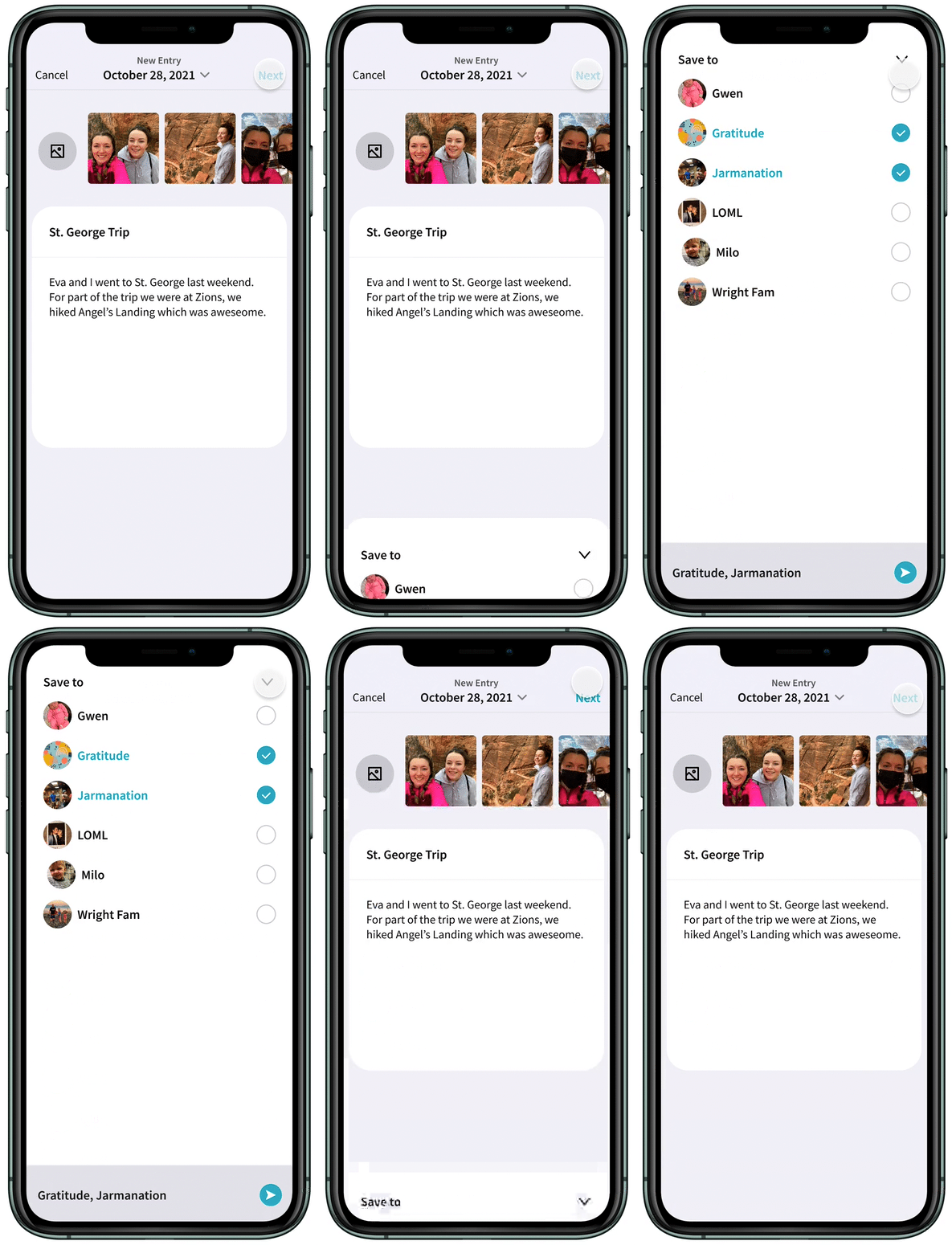
It can be hard to find time to journal. Told provides a simple, two step process to minimize the time it takes to add an entry.
• Easily save one entry to multiple journals.
• Customize dates to add entries retroactively.
• Save multiple photos to one entry.
Journal Views
Viewing journal entries
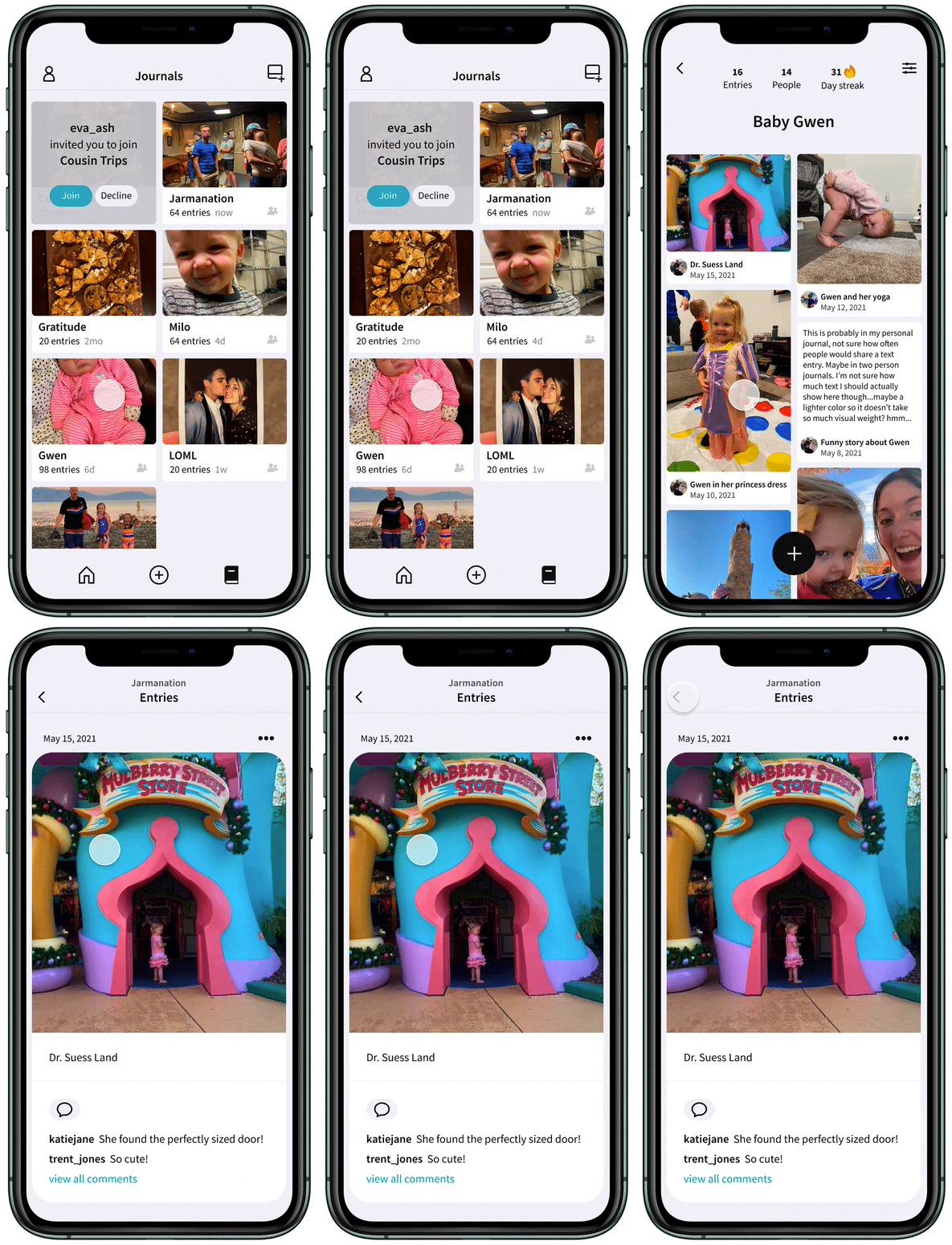
Enjoy multiple views of your journals. Scroll through thumbnails of all of your content or select an entry for a more detailed view that includes comments from anyone shared in the journal.
• See all your journals in one page.
• Scroll through a beautiful thumbnail view of all you content or select an entry to get a more detailed view.
• View and respond to comments made by collaborators on your entries.
• Check on your ‘streak’ to see how long you’ve been adding daily entries.
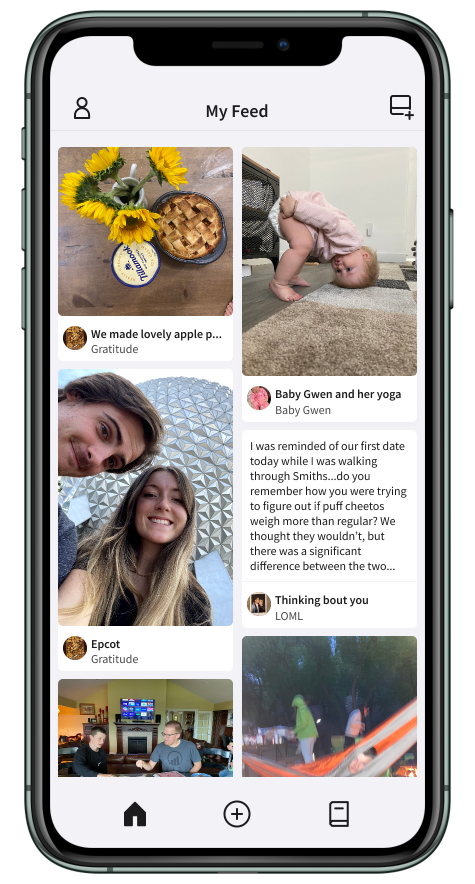
My Feed
One page for all new content
Told’s home page is a feed of all new content from all of your journals, shared or private. See the small moments your friends and family share.
• Land on a feed of your closest friends and family members intimate and important moments.
• Select an entry for a more detailed view.
• Easily add an entry or journal as soon as you open the app.
Designing/Prototyping
Complete Component Library
I created an extensive component library to speed up my design time and limit redundancies.
Complex Components
I used Figma’s auto layout and variants to make multi-purposed components.
Icon Library (angularicons.com)
Using icons from angularicons.com, I organized and framed them to easily interchange within components.
Dark & Light Mode
I made components in light and dark mode to easily switch between both.